
It’s Attack of the Citizen Developers, the rerun.
We’ve had this conversation before. When AI chat tools first showed up, people in the business tried using ChatGPT, Copilot, and Claude to build their own Power Automate flows and Power Apps. They’d get halfway through and stop. It got too complicated. They’d come back the next day and forget what they did the day before.
This is that same conversation, round two. Only now, nobody’s wiring up flows. They’re building apps by talking: describing what they want, seeing it appear, and clicking around in it. Everybody’s building what they consider apps. They show them to everybody, everybody gets super excited, and then they hand it over to IT and say: make it real.
This isn’t one project or one company. It’s come up at a couple of different companies, and it’s only picking up.
The Good News#
Let’s start with what’s great about this, because a lot of it is great.
The best part is what happens to the idea. Everybody has a picture in their head of the app they want, but getting that picture out has always been the hard part. Building the mock-up shakes it loose. The idea comes out in a form the rest of us can actually see and understand.
Without that, someone has to dig it out by hand. A developer or a business analyst sits with them, asks question after question, and thinks through every scenario, just to get enough detail for a basic wireframe. Going from an idea to a concept to a working app that way takes a lot of time, and it’s exhausting for whoever is doing the digging. You build something, show it, and hear “that’s not quite it,” then go around again.
Now they’ve already done that part. They’ve built the prototype and clicked through it themselves until it covers what they need. It has the right screens. It has the right data, down to the individual fields. By the time it lands on your desk, the business has already agreed this is the thing they want.
That used to be weeks of work. Now it shows up on day one.
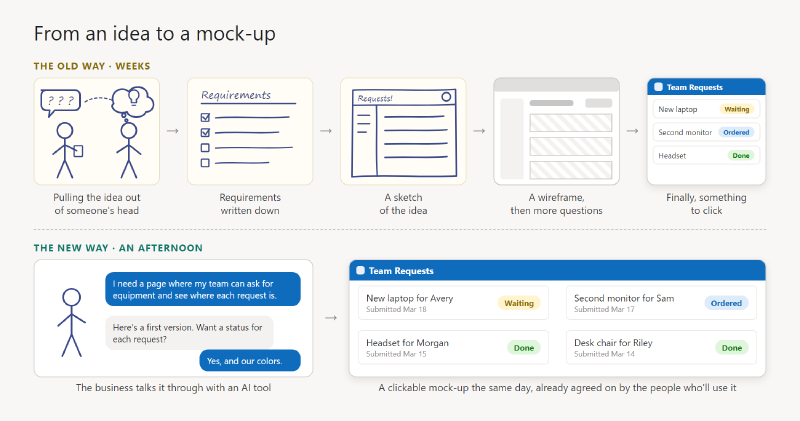
And the mock-ups usually look pretty good. Most of them have the stock look the AI tool gives everything, which is clean and decent, if a little basic. Some people go a step further and add their company’s branding and colors, which is a nice touch. And if the person has a good eye for design, they can make it a lot prettier just by describing what they want. Either way, you’re starting from a real picture of the finished thing, not a sketch on a whiteboard.
What They Think They Built#
This is the part people don’t see coming.
They think they’ve built an app. Something finished that IT can just pick up and move into the company’s environment, like copying a file from one folder to another.
What they’ve actually built is a design. A really good one: a high-resolution mock-up, a clickable prototype. But it doesn’t port to anything. It can’t talk to anything. You can share a link and people can click around in it. Some tools can even save a little data. But that’s not the company’s database, with the company’s security and backups behind it.
And the first question nobody’s thought about is the simplest one: where’s it going to live? It can’t stay inside Claude.ai, or whatever AI tool it was built in. That’s a place to make things, not a place to run the company’s apps. Somebody has to find it a real home, with real sign-in and a real place to keep the data, and that somebody is IT.
What It’s Missing#
Here’s the catch. What you’ve been handed looks like an app, but there’s no plumbing behind it.
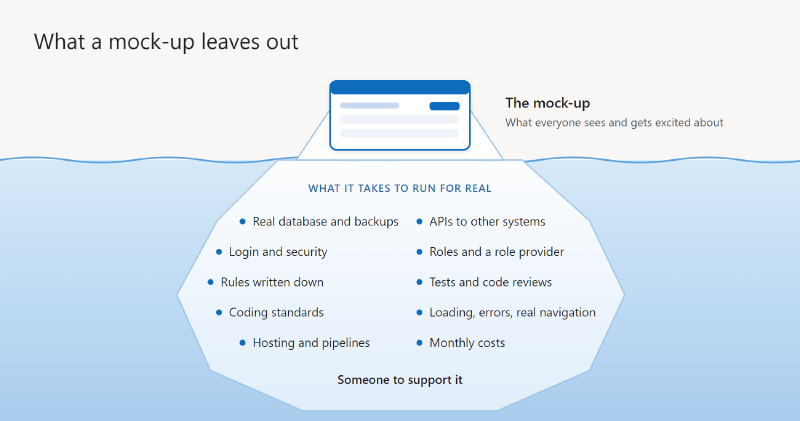
There’s no real database. The data you see is baked into the page, or it disappears when you close the tab. There are no APIs, the connections that let an app save data somewhere safe and talk to the company’s other systems. Everything that looks like it works is pretend.
And it’s usually not built in any kind of normal web format. It’s raw HTML, JavaScript, and CSS: the bare building blocks of a web page, all hand-stitched together. That’s fine for a prototype. It’s not something you’d ever want to deploy, and it’s definitely not something you’d want to support for years. Picture a complicated website written that way, and then picture being the one who has to fix it when it breaks.
To make it real, you rebuild it in a proper framework, like React. A framework gives you a standard way to do the things every real app needs:
- Handling data properly, loading it, saving it, and keeping it in step with the database.
- Keeping track of what’s going on in the app as people click around, which developers call state.
- Reacting to what people do, the clicks, typing, and changes, in a consistent way.
- Starting up, updating, and cleaning up each part of the screen at the right time.
- Being testable, so you can prove it works today and still works after the next change.
The mock-up is the picture on the box. The framework is what’s actually inside it.
Everything Else IT Still Has to Do#
Rebuilding it properly is only the start. Here’s the rest of the list, none of which shows up in a mock-up:
- Write down what it should and shouldn’t do. The mock-up shows what it looks like. It doesn’t say what happens when someone leaves a field blank, enters the wrong date, or isn’t allowed to see something. Those rules have to be written down, agreed, and kept up to date.
- Write the tests. Every one of those rules becomes a test case, and the important pieces of code get their own small automated tests, called unit tests. That’s how you catch a broken rule before your users do.
- Make the experience real. In a mock-up, clicks often go nowhere, or straight to a perfect answer. In a real app, every click has to lead somewhere: opening a new window, moving to the next page, coming back to where you were. While data loads, people need a proper loading indicator, not a frozen screen. And when something goes wrong, the app has to say so in plain words.
- Follow coding standards. The code has to follow the team’s rules for how things are written and organized, so the next developer can read it, change it, and trust it.
- Login and security. Real company accounts, not a made-up login screen. Every page and every piece of data has to check who’s asking before it answers, not just hide a button.
- Roles. Managers see their team. Staff see their own. Admins can change settings. Somebody has to decide what each role can do. The app also needs a role provider: one trusted place, usually the company’s own directory, that says who has which role. That way access is managed in one spot instead of inside the app.
- Security review. Somebody in IT has to sign off on what it can reach and who can reach it.
- Cost. Hosting, licenses, and AI usage, every month, forever.
- Who fixes it when it breaks, and who updates it next year.
- Everyone can use it. Phones, screen readers, slow connections.
Before You Hand It Over#
If you’re the one who built the mock-up, you can make IT’s job a lot easier. Before you hand it over, write down:
- What it should and shouldn’t do, especially the edge cases: what happens when a field is left blank, or someone isn’t allowed to see something.
- Where the data comes from, and where it needs to go. Which systems does it have to talk to?
- Who will use it, and what each kind of person should be able to see and do.
- How important it is. Could the business live without it for a day, or does work stop?
- Who’s going to support it once it’s live.
None of that shows up in a mock-up, and every bit of it is something IT will ask you anyway.
How the Hand-Off Should Go#
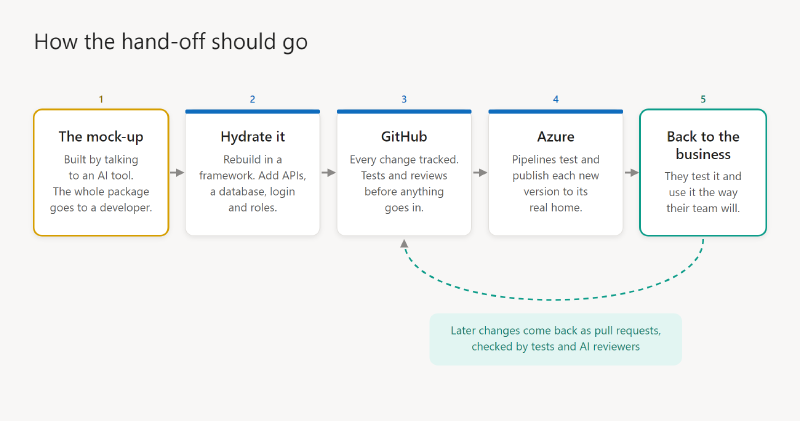
So what do you actually do with it? Here’s the path I’d follow.
- Hand the whole package to a developer. Not a screenshot or a demo link. The actual files from the AI tool: every page, every bit of code, the whole prototype.
- Let them hydrate it. That’s the developer’s job now: take the shell and fill it with the real thing. Rebuild it in a proper framework, add the APIs, wire it to a real database, and wrap it in real login and security.
- Put it somewhere real. Check the code into a GitHub repository, so every change is tracked. Set up pipelines, the automated steps that test and publish each new version, and deploy it to Azure.
- Test it. Make sure it works. Check that it matches the mock-up, that it’s pulling in the right data, and that login and roles do what they should.
- Give it back to the person who built it. Have them use the real app, the way they and their team actually will. They know better than anyone whether it’s right.
How long does all that take? It depends on what you’re building. The rebuild might take a week, or it might take a month. Then you have to test it properly, and that can take another month. A developer can use AI to speed up the rebuild too, but someone who knows what they’re doing still has to steer it, check it, and stand behind it.
After Launch: Who Makes the Changes?#
Here’s where it gets interesting. The person who built the mock-up will want changes, and they don’t have to stop using AI to make them.
They can keep using Claude, or another AI tool, to suggest changes to the real app. Each change goes in as a pull request: a proposed change that has to be reviewed and approved before it becomes part of the app. The repository can carry instructions and skills for the AI, so it knows the house rules: how to publish a new version, how to write test cases, and what has to happen before a change goes in.
The guardrails do the rest:
- Every test has to pass before a change can go in.
- Every change gets a code review, looking for anything that could break the app.
- AI reviewers on GitHub, like GitHub Copilot, Claude, or OpenAI’s tools, can check every pull request automatically, so nobody’s slipping junk in.
Now, a disclaimer. I am in no way a fan of letting citizen developers support their own apps. If the app holds critical data, or the business can’t run without it, IT should own it. Full stop.
But not every company has an IT team, and not every app is critical. If you’re in that spot, and you’re building something the business could live without for a day, this could be a fit, with one condition: a trained professional sets it up first. A real developer or architect builds the foundation correctly and puts the guardrails in place. Then the person who wants the changes describes what they want, and the AI has enough instructions to follow the rules.
This is experimental. It’s not for everybody, for sure. Even then, before anybody agrees to it, ask the question that matters most: who’s going to support this? If someone pushes an update and it takes the whole app down, what are you going to do?
Wrapping Up#
The mock-up isn’t the problem. Honestly, it’s the best set of requirements IT has ever been handed: every screen, every field, already agreed on by the people who’ll use it.
The problem is mistaking it for the app. A mock-up is a design. The app is everything underneath: the data, the security, the tests, and somebody who answers the phone when it breaks.
So if you’re the one who built it, before you show it to everybody, ask one question: who’s going to support this? And if you’re in IT, don’t groan when one lands on your desk. Somebody just did the hardest part of your job for you.