
In my lease routing post, single-purpose documents worked great, and I mentioned that files with a bunch of things jammed into them don’t. This post is about those files.
These were giant archive packets: leases, rental agreements, cancellations, letters, all scanned into one PDF. We had to find the lease data across about 25,000 files, without paying someone to read them all or paying a top-tier AI model to do it.
The short version: a cheap AI model plus simple checks worked about as well as a far more expensive model.
The Architecture#
The work happens in three places: SharePoint, a local machine, and Microsoft Foundry (the Azure service that used to be called Azure AI Foundry).
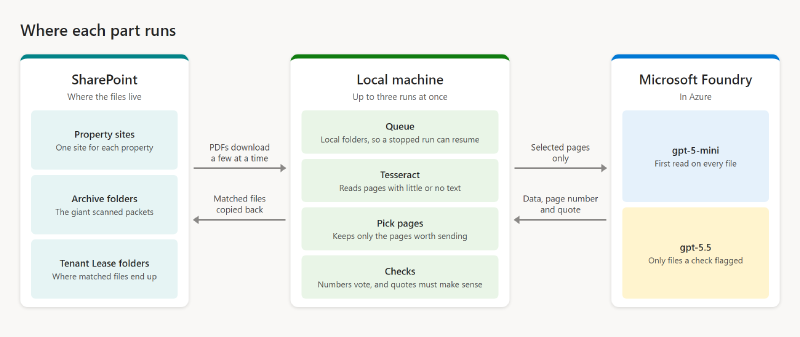
- SharePoint holds the files. The packets sit in archive folders across the property sites. PnP PowerShell signs in, crawls those folders, and downloads a few files at a time, as the local queue has room.
- A local machine does the heavy lifting. Tesseract, page picking, and the checks all run here. Up to three PowerShell windows run at once, each working on a different property.
- Microsoft Foundry does the reading. gpt-5-mini and gpt-5.5 are both deployed here. The tool sends only the selected pages and gets back the data, the page it’s on, and a quote.
When a file matches a tenant, PnP PowerShell copies it to that tenant’s Lease folder back in SharePoint.
Why We Ran It Locally#
This first bulk pass is a one-time job, so it runs on a local machine as a standalone tool. There are no new queues or Azure Functions, and it can’t touch the live document router. We may move it to the cloud later.
Local doesn’t mean offline. Tesseract and the checks run on the machine, and the selected pages go to Microsoft Foundry.
How It Works#
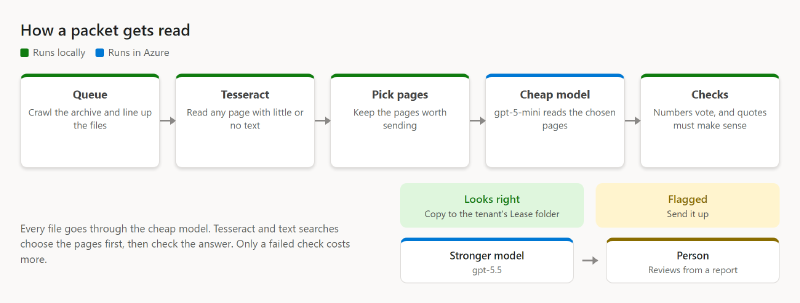
1. Queue the files. A crawl of SharePoint builds a list of archive files. Each one downloads and moves through local folders: inbox, OCR, AI, then filed, review, or errors. A stopped run can pick up where it left off.
2. Get text from every page. If a page has under 20 characters of text, Tesseract reads it at 200 DPI. Otherwise we keep the text already in the PDF. A page counts as scanned if a single image covers at least half of it, whatever text it claims to have.
3. Pick the pages worth sending. The first two pages, pages that identify a lease, pages with the wording we’re looking for, and each lease cover plus the next four pages. There’s no fixed page cap.
4. First read with a cheap model. Every file goes to gpt-5-mini in Microsoft Foundry at low reasoning effort. Digital pages go as text. Scanned pages go as 150 DPI images with the page number stamped on them. It returns the document type, tenant, the data we want, the page it’s on, and a word-for-word quote.
5. Check the answer. This is where most of the value is:
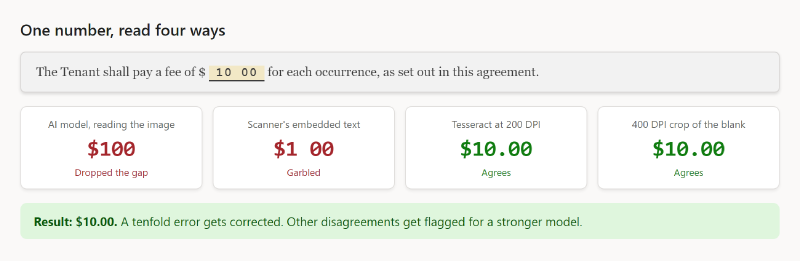
- OCR vote on numbers. The scanner’s text, Tesseract at 200 DPI, and a 400 DPI crop around the number all weigh in. If they point to an obvious misread, the number gets corrected. Other disagreements get flagged.
- The quote has to make sense. It has to read like the clause it claims to be, and boilerplate gets thrown out.
- Page references get repaired, and when a file has several documents, the newest one wins.
6. Escalate only when something looks wrong. Any real flag sends the file to gpt-5.5, also in Foundry, with the same pages and prompt. The first answer is kept for audit.
7. Then a person looks. If it’s still flagged, it goes in a report with a link to the PDF, the page, and the quoted clause.
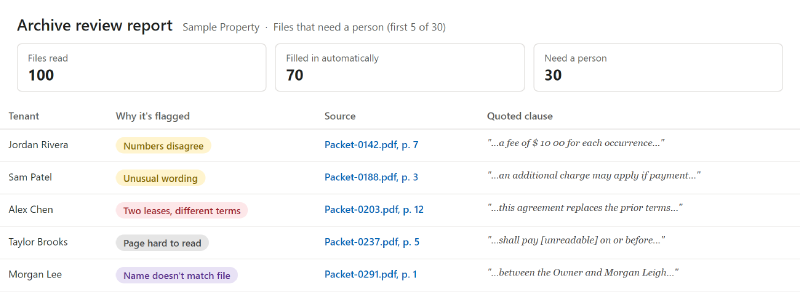
8. File it. We match the tenant and the property’s SharePoint site, then copy the file into the Lease folder for that tenant’s apartment. The tool never overwrites, never creates folders, and never deletes originals. Everything else goes to review with a reason.
What It Cost#
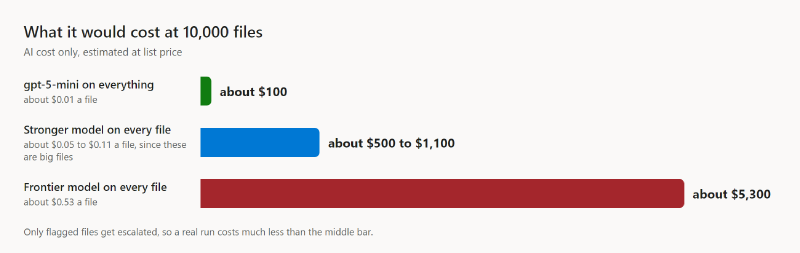
Tesseract runs locally, so the cost is mostly the AI. These are estimates at list price, not invoices, scaled up to show what it would take at 10,000 files:
| Approach | Cost per file | At 10,000 files |
|---|---|---|
| gpt-5-mini on everything | about $0.01 | about $100 |
| Stronger model on every file | about $0.05 to $0.11 | about $500 to $1,100 |
| Frontier model on every file | about $0.53 | about $5,300 |
The stronger model is a range because these are big files. Only flagged files get escalated, so a real run lands much closer to the first row than the second. One property with 525 files came in at about $4 at the base tier. Time ran about 0.7 minutes per file at the median, with sites running at the same time.
What We Learned#
Stronger models don’t always do better. There isn’t a lot of thinking to do here. The model is looking for keywords and specific pieces of information, so with a good prompt, a mini model can find them for far less. After our checks, the cheap model got 47 of 49 hard files right. gpt-5.5 got 46, using more than twice the tokens.
Categorize first, then go up a model. Work out what kind of document it is. If a check fails, a stronger model reads the same pages to see if there’s anything the lighter one didn’t pick up.
It comes down to repetition. Run a batch, check it by hand, refine. Then do it again. We refined the process for about two weeks to get it as close as possible.
Don’t trust the text in a scan. Scanners embed their own text, and it can be garbled. It even fooled one of our checks, which reused that text and outvoted a correct reading. Now we judge pages by their content and run OCR on an image of the page.
The most expensive model found nothing new. A frontier model cost about $24 for 44 files. It found two items we’d missed, and both were already in our simple text scan.
One test set proves little. The same cheap model looked terrible on one set of hard cases and best on another.
Vision models drop zeros. A typed “10 00” can read as 100. Now Tesseract settles the digits.
Stamp the page number on the image. In big batches, the model’s page references were off by four or five. Stamping the number on each page fixed it.
Your prompt can leak into the answer. A model added “or 5%” straight from the prompt’s own example. Now a percentage needs evidence on the page.
What’s Still Hard#
- Packets with several leases on different terms stay ambiguous, because nothing finds where one document ends and the next begins.
- Unusual wording still needs a person.
- We measured accuracy closely on one property, not the whole archive.
Wrapping Up#
We processed about 25,000 files, and about 30% of them still needed someone to read them. That’s still a lot of reading, but it’s a significant reduction from having people go through all of it.
It couldn’t really get much closer than that, because the files have so much variety. Scan quality varies, some data is missing, and some of it is just unreadable. And every extra page you send to the model costs tokens, so you’re always balancing how much you send against what you get back.
If you have a pile like this, don’t start by shopping for the strongest model. Start with a cheap one, write checks that catch its mistakes, and only pay more when a check fails.