
A small resort ran its whole week from one spreadsheet. It had 68 columns, and reservations, housekeeping, the kitchen, medical, and the spa all worked in it. They printed it out so small you could barely read it, at something like a 10-pixel font, and carried it around.
They hired us to replace it with an app. I assumed the hard part would be building the screens. It wasn’t.
The hard part was working out what the spreadsheet actually meant, because the people using it had never needed to think about that.
Start by Watching#
I started by sitting with each team and watching them work: who opens the sheet, which columns they care about, what they type, and what they print.
Asking “what do you need?” only gets you part of the way. People describe the job the way they think about it, and they skip the things they do without thinking. Those were the things that mattered most:
- At the start of each week, they copied last week’s rows into the new week’s sheet.
- The same information lived in several places, because each team wanted it in its own block of columns.
- Colored bars across the top told each team where its block started.
- Before printing, they’d change things by hand, just for that printout.
None of that was in anyone’s requirements. You only find it by watching.
What surprised me most was how much of the spreadsheet was written in a code only the team could read. It wasn’t how I’d have imagined anyone running a business.
Colors meant things, and nothing explained them. One color was Monday, another was Tuesday, another Wednesday. Rows copied over from last week went into italics, so everyone knew they were old. Bold text meant one thing, and colored text meant another. There was no key anywhere. Everybody just knew.
It worked for the people who’d been there for years. But it wasn’t written down anywhere, so a new hire couldn’t read the sheet, and neither could I.
Most of those tricks were there to make up for what a spreadsheet can’t do, and an app doesn’t need them. Instead of italics to mark last week’s entries, a field can start empty and still keep a history of everything that was entered and changed, and by whom. Instead of telling everyone to reopen the file, a change shows up on everyone’s screen on its own. The job wasn’t to copy the code. It was to learn each rule, work out what it was for, and build that in so nobody has to remember it.
They Saw Rows. The App Needed Objects.#
To the staff, a guest’s visit was one row. You could copy it, paste it, and change whatever you liked. That’s why Excel is so easy to work with.
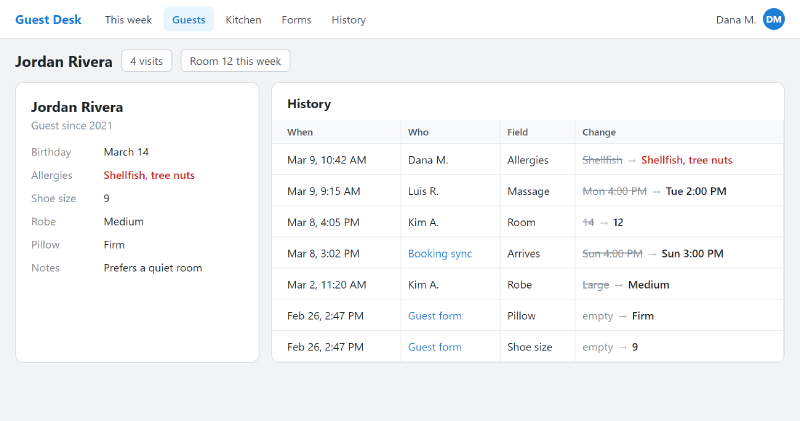
An app can’t work like that. Behind that one row were really several different things: a guest, a reservation, and later on, an appointment. Each one has its own fields and its own rules. Getting from one way of seeing it to the other was the hardest part of the project, on both sides.
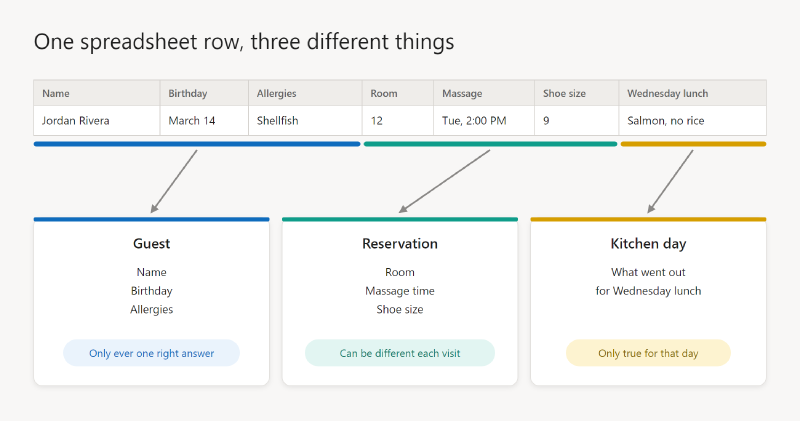
Part of the job was teaching. When someone changes an allergy, they aren’t changing a cell in this week’s row. They’re changing a fact about a person, and it shows up everywhere that person appears. That took a while to land, and I had to keep coming back to it.
The same went for what goes in a field. In a spreadsheet, you can paste anything anywhere: a note in a date column, a name in a number column. In an app, a date has to be a date, and the same fact has to agree on every tab and every screen. The staff didn’t need to become database experts, but they did need to get the idea, at least partly, before we could get going. Until then, we weren’t speaking the same language.
The question that finally sorted it out: could two different answers both be right at the same time?
- A birthday or an allergy can only have one answer. It lives on the guest. An allergy also has to reach every booking, including one already made for next spring.
- A room or a massage time can be different on each visit, and both are right. It lives on the reservation.
- What went out for lunch on Wednesday is only true of Wednesday. It gets its own record for that day.
More than a hundred fields went through that test, and it decided where each one belonged.
We Got It Wrong, and the Copy and Paste Was Right#
Here’s where the staff taught me something.
One of the first things they told us was that they wanted to stop copying and pasting last visit’s details for every guest. So I treated copying as the problem. The guest’s preferences got one copy, stored on the guest, with no duplicates.
It looked clean, and it was wrong. A guest stayed two weeks in a row and wanted different massage times each week. Setting up the second week changed the first, because there was only one copy.
Their copy and paste had been doing a real job. Most guests want what they had last time, but they’re allowed to change their mind, and last time’s answers have to stay as they were.
So now a new booking starts as a copy of the guest’s most recent answers, made once, when the booking arrives. Then it’s on its own. Staff still get the head start they had with copy and paste, without doing the pasting. Allergies never get copied, because there’s only ever one answer.
I made a similar mistake early on with tables. The spreadsheet had a block for each department, so I gave each department its own table. Not one row ever used that separation, and those tables were eventually folded away. The layout of a spreadsheet tells you how people read it, not how the data is shaped.
Keep What Made Excel Good#
People weren’t using Excel by accident, so I kept what they loved about it:
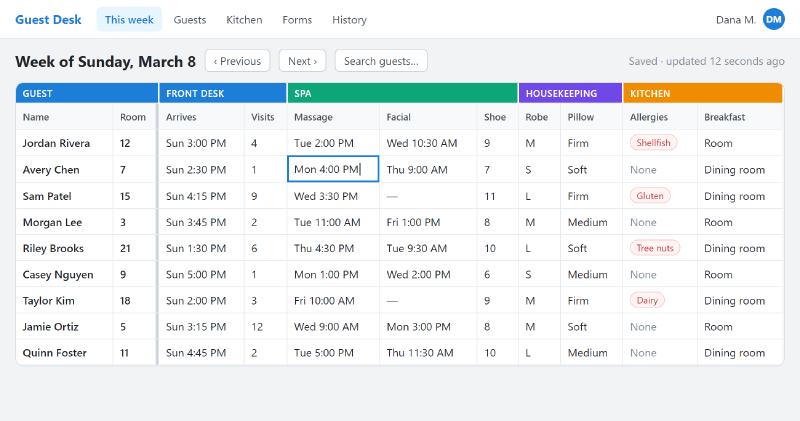
- Tab across a week of guests and type. No opening a form for each one. A cell saves when you leave it.
- The colored blocks. Teams find their columns the same way they always did.
- The names and room numbers stay on screen as you scroll sideways, the way frozen columns do.
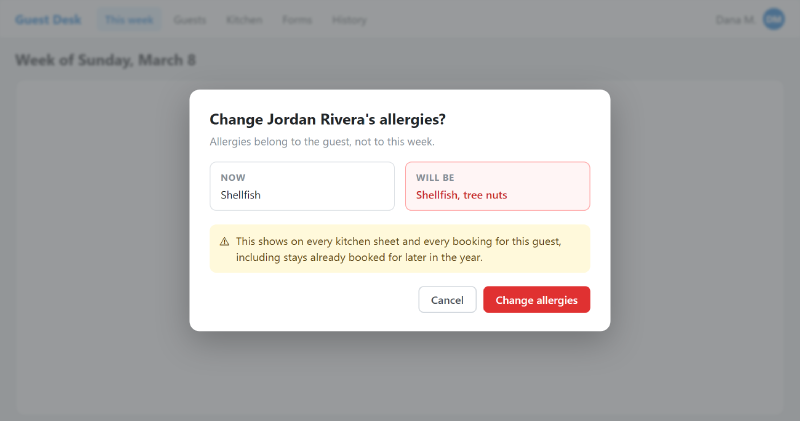
And I added the one thing Excel couldn’t do. Tabbing through cells is fine for a shoe size, because a typo gets noticed and fixed. An allergy is different, because it gets read at a glance by a cook who didn’t type it. So changing an allergy stops and asks you to confirm, showing what it says now and what it would say.
The Reports Were Half the Job#
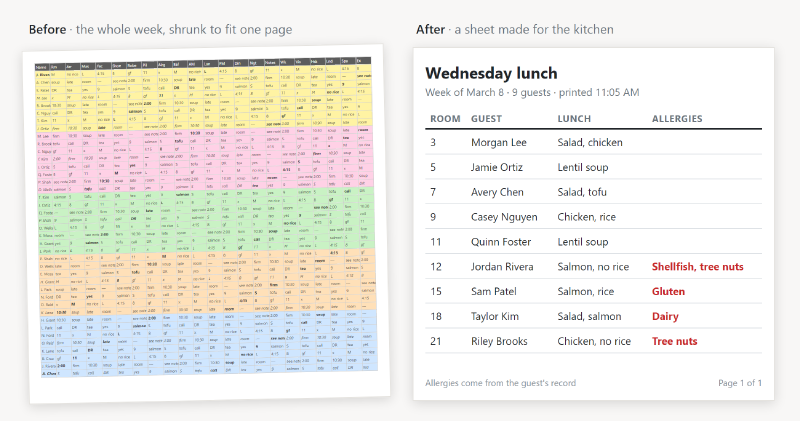
The other surprise was the printing. Their reports weren’t reports in the usual sense. They’d export from Excel, format the data, and jam it into another program to get the sheet they wanted. Over the years, that had become a stack of paper the whole place ran on: arrival sheets, kitchen sheets, door tags, name badges, comment card labels, billing folders.
Every one of those had to move into the app, and each one had rules nobody had written down:
- Paper size matters. Housekeeping and the laundry read a whole week across a row, so they print on 11 x 17. On regular paper the columns shrink past reading.
- Shrink some, not others. The weekly meeting wants everything on one side. Sheets people work from run as many pages as they need, because a squeezed note is no use to anyone.
- Some edits aren’t corrections. A guest might want a nickname on one list. That’s how this week’s paper should read, not a change to their record, so it stays on that sheet and doesn’t touch the guest.
That last one is a good example of why you can’t just build the database and call it done. In Excel, nobody had to decide whether an edit was “real.” In an app, somebody does.
Write Down How the Place Works#
Every time someone told me how the place runs, I wrote it down with a list of what in the app depends on it. That rule book now has more than 30 rules.
It paid for itself quickly. Most of what looked like a bug in review turned out to be the app correctly following a rule nobody had written down. Once the rule was on paper, the same question stopped coming back.
What We Built#
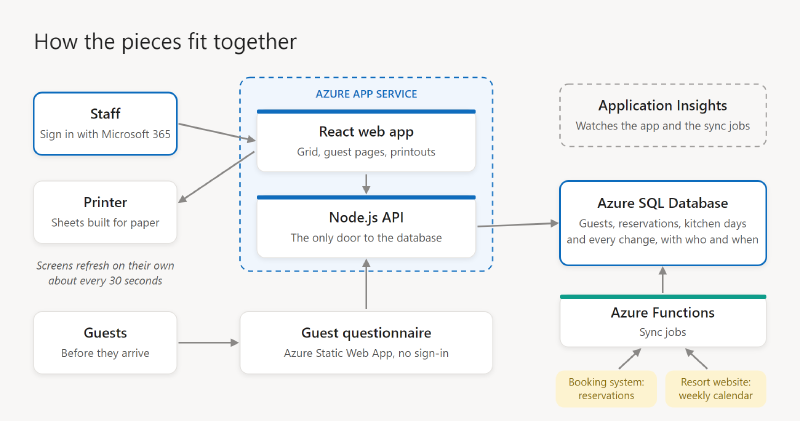
The finished product is a custom React web app running in Azure. Here’s what’s underneath, for anyone curious:
- A React web app for everything staff see: the spreadsheet-style grid, the guest pages, and the printouts. The grid keeps what people liked about Excel, with names frozen on the left and cells you edit in place.
- An API in Node.js, which is the only thing that talks to the database. It sits in the same Azure App Service as the web app, so there’s one site to run.
- Azure SQL Database holds the guests, reservations, kitchen days, and everything else. This is where the rules live that keep the data straight, so a date is always a date and an allergy is stored once, on the guest.
- Azure Functions run the sync jobs. When a reservation is made or changed in the resort’s property management system, it sends the change over, and a Function writes it into the database. Another job picks up the resort’s program calendar from its website once a week.
- Sign-in with their Microsoft 365 accounts. Azure checks who you are before the app even loads, so there’s no separate password and nothing for us to manage.
- A history of every change. Each time someone saves, the API compares the record before and after and keeps a line for every field that changed, with who and when. That’s what replaced the italics and colors.
- Live updates. Every screen checks for changes about every 30 seconds, so what someone else typed shows up without anyone refreshing.
- Printouts built for paper. Each sheet is its own page designed for printing, not a web page sent to the printer.
- A questionnaire for guests. Before they arrive, guests fill in a short form, which goes straight into their record. It’s the one page that doesn’t need a company sign-in.
- Monitoring with Application Insights, so when something goes wrong, we see it before the front desk calls.
What I’d Tell Someone Doing the Same Thing#
Watch before you ask. The requirements are in what people do, not what they tell you.
Ask what every color means. Each color, bold and italic is a rule somebody follows, and none of it is written down.
Treat the spreadsheet as evidence, not a design. Every column and printout exists for a reason. That doesn’t mean it should become a table.
Before you remove a habit, find out what job it’s doing. We almost designed away the copy and paste, and it was holding up part of the business.
Budget for the printing. If people carry paper today, the reports aren’t an extra. They’re the product.
Plan to teach. You aren’t only replacing a tool. You’re changing how people picture their own work.
How It Turned Out#
They love the new app. It does everything they asked for and more, people are happier, and they get more done. We’re still building on it.
Every department but one is off the spreadsheet. That last one is a big piece of work, so we saved it for the end, to first work out some kinks in how its information syncs with everything else. Bringing it into the app is next.